- Sky
- Blueberry
- Slate
- Blackcurrant
- Watermelon
- Strawberry
- Orange
- Banana
- Apple
- Emerald
- Chocolate
- Charcoal


ZefTheFox
-
Posts
9 -
Joined
-
Last visited
-
Days Won
3
Everything posted by ZefTheFox
-
 I've been working on a new server called "Freedom And Creativity" (Name subject to change). This is a creative building server set in a standard minecraft world. It features mods such as LittleTiles and OpenComputers, so whether you're a builder or a programmer you can find something to enjoy. This modpack is rather light-weight and should run on a wide range of machines. The server currently has 2.5GB of ram allocated to it, so please forgive any minor lag, in my testing it has maintained a solid 10-15 TPS while generating terrain. The player cap is currently 20, but may be raised or lowered as performance is measured. We feature a ranking system, currently consisting of 3 main ranks. As you progress through them you will gain the ability to claim more chunks using FTBUtilities. IP: 71.60.135.124 Modpack Twitch Profile - https://drive.google.com/open?id=1Aa1_jlnVbTlsUVTiCXSL_LUL1TZaybVw Raw mods folder - https://drive.google.com/open?id=1jStLpatxC32Q9cwYU4XuFyJEWg_HFQ8e The modpack may be subject to change, to update mods to their latest versions. The mods, particularly littletiles, are still in development and are subject to frequent updates. The mod compilations were last updated 3/8/20 at 5:37 EST
-
- 1
-

-
By calling hres.set(x, y, state) you can set a pixel at that x, y position to either be the foreground, or the background color. The x and y positions are the exact pixel location you'd like. This allows for a theoretical maximum resolution of 320 by 200. This is achieved by using the Unicode braille characters. To get the current "hres" resolution you take the screens current x resolution and multiply by 2, and you take the screens current y resolution and multiply by 4. There may be bugs, and things may behave oddly if you try to "turn off" a pixel that was not "on" in the first place. local gpu = require("component").gpu local unicode = require("unicode") hres = {} function hres.set(x, y, state) local x = math.floor(x) local y = math.floor(y) local scrx = math.ceil(x/2) local scry = math.ceil(y/4) local maxx, maxy = gpu.getResolution() if scrx > maxx or scry > maxy or scrx < 1 or scry < 1 then return end local prechar = gpu.get(scrx, scry) _, prechar = utf8.codes(prechar)(prechar) local offset = 0x2800 local offsetx = (x-((math.floor(x/2))*2)) if offsetx == 0 then offsetx = 2 end local offsety = y-(math.floor(y/4)*4) if offsetx == 1 then if offsety == 0 then brs = 7 else brs = offsety end else if offsety == 0 then brs = 8 else brs = offsety+3 end end local offsetdec = 2^(brs-1) if prechar < offset or prechar > 0x28FF then prechar = offset end if state then gpu.set(scrx, scry, unicode.char(prechar+offsetdec)) else gpu.set(scrx, scry, unicode.char(prechar-offsetdec)) end end
-
Update an addon version is being developed, I suggest waiting until that is finished before downloading this, it'll be much better!
-
Thank you! If you have any suggestions be sure to let me know!
-
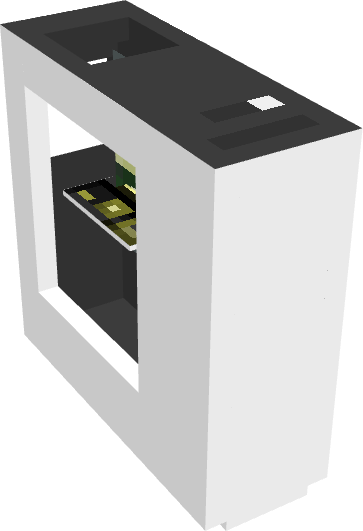
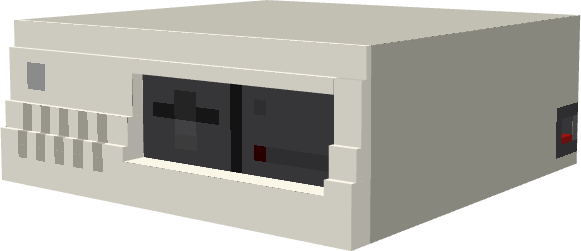
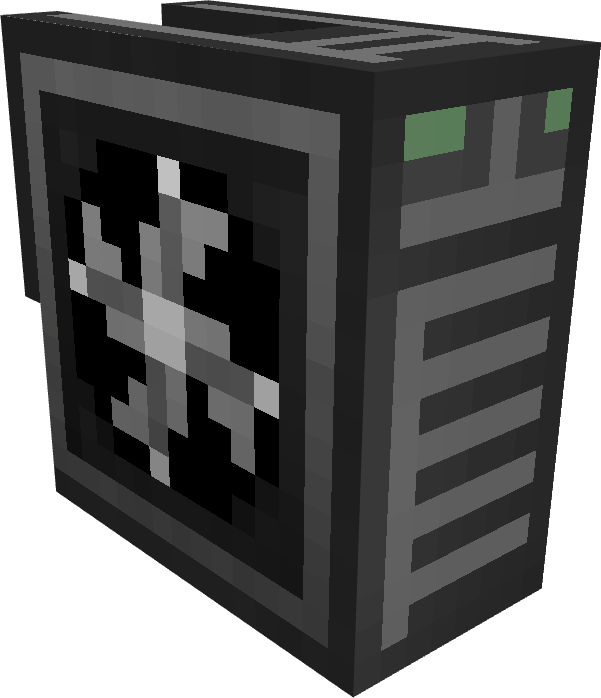
THIS MOD IS NO LONGER SERVICED, PLEASE DOWNLOAD THIS INSTEAD!!! A while ago there was a post on here about someone making custom cases, I am not that person but I do have a release. This may be improved upon in the future but as of right now it is in a completely usable state. This is a client side replacement for opencomputers. Do not use with normal opencomputers. This will be updated to release versions of OC and will not be for 1.7.10 Theoretically this should be usable as a client connecting to a server with normal opencomputers, this was not tested. To use this install this modified version of opencomputers, it includes a custom case with it. If you want a different case you can choose to install a resource pack, I have made 2 so far. If a resource pack says it is incompatible for any reason ignore it, it's a single number in the pack.mcmeta that has to be different for certain minecraft versions, it will not effect the pack. The default case that comes with the mod: 1.10, OC version 1.7.3 1.11, OC version 1.7.3 1.12, OC version 1.7.3 NZXT Case: download IBM 5150 Case: download Let me know of any issues, or any suggestions for future cases.

- 4 replies
-
- 2
-
-
- replacement
- release
- (and 1 more)
-
From my glance at the wiki it appears you would need 2 redstone cards in that computer, one for each frequency. You can only appear to set one frequency at a time. However as I'm writing this a possible workaround would be to have a loop running that checks the wireless state and switches the frequency, so something along the lines of this: while true do -- not a great idea, change it so it has a condition redstone.setWirelessFrequency(freq1) -- Set first frequency local input = redstone.getWirelessInput() if input == whatever then -- do stuff end redstone.setWirelessFrequency(freq2) -- Set second frequency local input = redstone.getWirelessInput() if input == whatever then -- do more stuff end os.sleep(1) -- Sleep for 1 second, it might be in miliseconds so in that case change it to 1000. I can't remember right now end
-
That is a disk drive from the mod ComputerCraft, try the one from opencomputers
-
I am working on something similar, it will only be available for 1.8+ and I'm doing this in my free time so it may never get released. However it's almost ready, I will make a post once I get finished!